Five pumps ahead. One sign is cheapest.
The truck leaves at 34% tank with 214 miles to the next good price. Five stations sit on or near the lane, each with a sign price. Most fleets stop at the cheapest sign.

Prescriptive fuel optimization for commercial fleets
FuelGuru turns tank level, your fleet-net prices, taxes, detour and policy into one prescription per trip: where to stop, when, and how many gallons. Delivered into the driver's navigation and measured against what was bought.
74% → 98%+ compliance at a 2,500+ truck carrierPrices updated several times a dayNo new hardware
This trip174 gal at your fleet-net rate2 stops3.1 mi out of routeboth compliant
Enter a lane, a truck and a tank level. FuelGuru returns the stops and the gallons, priced at your fleet-net rate.
Example trip. Station prices and detours are illustrative; the compliance result is the published figure.
The truck leaves at 34% tank with 214 miles to the next good price. Five stations sit on or near the lane, each with a sign price. Most fleets stop at the cheapest sign.
FuelGuru re-prices every candidate: your fleet price instead of the public price on the sign, state fuel tax normalized, the detour in miles and minutes, and the price at the hour the truck will actually arrive. The cheapest sign finishes last.
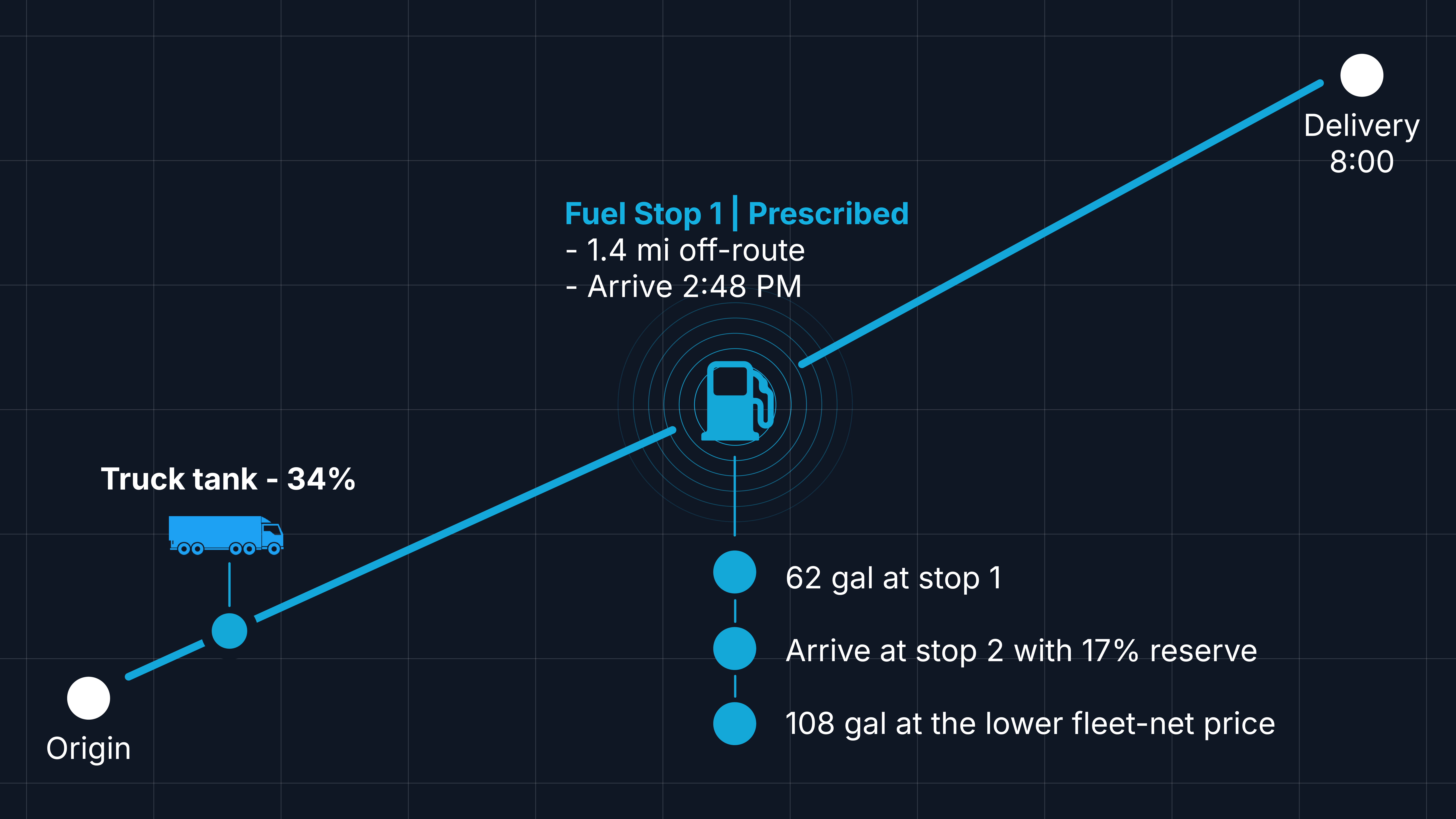
62 gallons at exit 42, not a full tank: arrive at 21%, leave at 58%, and buy the other 108 gallons 214 miles on at the lower price in the next state, with a 17% reserve. Two stops, 3.1 miles out of route in total.
The prescribed stop appears inside the driver's turn-by-turn with the station and the gallons. No app switch, no phone call, nothing to look up.
Fleet admin disables exit 42 fleet-wide. Every affected trip re-prescribes from the truck's current state: stop one moves to exit 63, 66 gallons, still inside the 2-mile out-of-route policy.
The fuel-card transaction lands next to the prescription: station, gallons, price paid. Match. Per driver, per stop, per trip, the fleet finally sees compliance instead of spend.
At a dedicated carrier running more than 2,500 trucks, prescription compliance moved from 74% to above 98% within four months of putting the plan inside the driver's navigation.
The truck leaves at 34% tank with 214 miles to the next good price. Five stations sit on or near the lane, each with a sign price. Most fleets stop at the cheapest sign.
FuelGuru re-prices every candidate: your fleet price instead of the public price on the sign, state fuel tax normalized, the detour in miles and minutes, and the price at the hour the truck will actually arrive. The cheapest sign finishes last.
62 gallons at exit 42, not a full tank: arrive at 21%, leave at 58%, and buy the other 108 gallons 214 miles on at the lower price in the next state, with a 17% reserve. Two stops, 3.1 miles out of route in total.
The prescribed stop appears inside the driver's turn-by-turn with the station and the gallons. No app switch, no phone call, nothing to look up.
Fleet admin disables exit 42 fleet-wide. Every affected trip re-prescribes from the truck's current state: stop one moves to exit 63, 66 gallons, still inside the 2-mile out-of-route policy.
The fuel-card transaction lands next to the prescription: station, gallons, price paid. Match. Per driver, per stop, per trip, the fleet finally sees compliance instead of spend.
At a dedicated carrier running more than 2,500 trucks, prescription compliance moved from 74% to above 98% within four months of putting the plan inside the driver's navigation.
The leak
Most fleets already have a fuel plan. The money goes missing between the plan and the pump.
Tank levels, prices and routes change after dispatch. Prices can change several times a day. A plan built at 9am for a 4pm fill can already be stale.
Detour, tax, toll and the next fueling opportunity change the answer.
A prescription in a back-office report cannot create savings. At one 2,500+ truck carrier, only 74% of prescriptions were followed before the plan moved into the driver's navigation.
Fuel-card spend shows what was bought, not what should have been bought.
The prescription
Per trip: ordered stops with the station, the expected arrival, the gallons to buy, the price at your card rate, and the detour to get there. "Go to this station" is a recommendation. "Buy 62 gallons here, then 108 at the next preferred stop" is a prescription.
Conventional stop plan
FuelGuru prescription
How much to buy comes from the fuel already on board, the reserve you require at arrival, the route ahead, the price opportunities on it, tank capacity and fleet policy. Sometimes the best fill is not a full fill.
Fuel stop 1
Illustrative1.4 mi off route · arrive with 21% in the tank
Why this stop
Trip prescription
Total fuel cost and saving vs fill-anywhere shown per trip
Four economics
Four effects stack. Most of them are invisible to anything reading a public price feed.
The rate your fuel program actually gives you at that location. Not the sign price, not a national average.
Station prices normalized for state fuel taxes and IFTA, so stops in different states are compared on what the fleet actually pays.
The miles and minutes to reach the station, priced against the pump saving and held inside your out-of-route policy.
Hours of service are in the plan, so each stop uses the latest pricing applicable to the truck's planned arrival window, not the file that happened to be available at dispatch.
Fuel strategy
Fleet adminPolicy
Set the policy once. FuelGuru applies it consistently across every eligible trip. Full or partial fill, the out-of-route cap, preferred networks and contracted pricing locations, penalties for stops set back from the highway, and stops a fuel manager has disabled.
Disable a stop once and every affected trip re-prescribes. Nobody has to call.
Drivers
A mathematically perfect stop that the driver skips saves nothing.
Every stop carries a score built from observed behavior. FuelGuru prescribes where the score is high. When a location keeps getting skipped, that becomes a signal it may no longer be practical, even when the price looks attractive on paper.
The prescribed stop appears inside the driver's turn-by-turn with the station and the gallons. Not a separate app the driver is supposed to remember to check. If the stop becomes unavailable or the trip changes, the route and the fuel plan recompute together.
Keeping another in-cab surface? The prescription goes into your TMS trip plan or that surface instead.
See NavGuru →Route economics
One dry-van lane, Harvey, Illinois to Philadelphia. FuelGuru priced six commercial routes on tolls plus fuel. The spread between them was $326 per load. The sharper finding was the price of time.
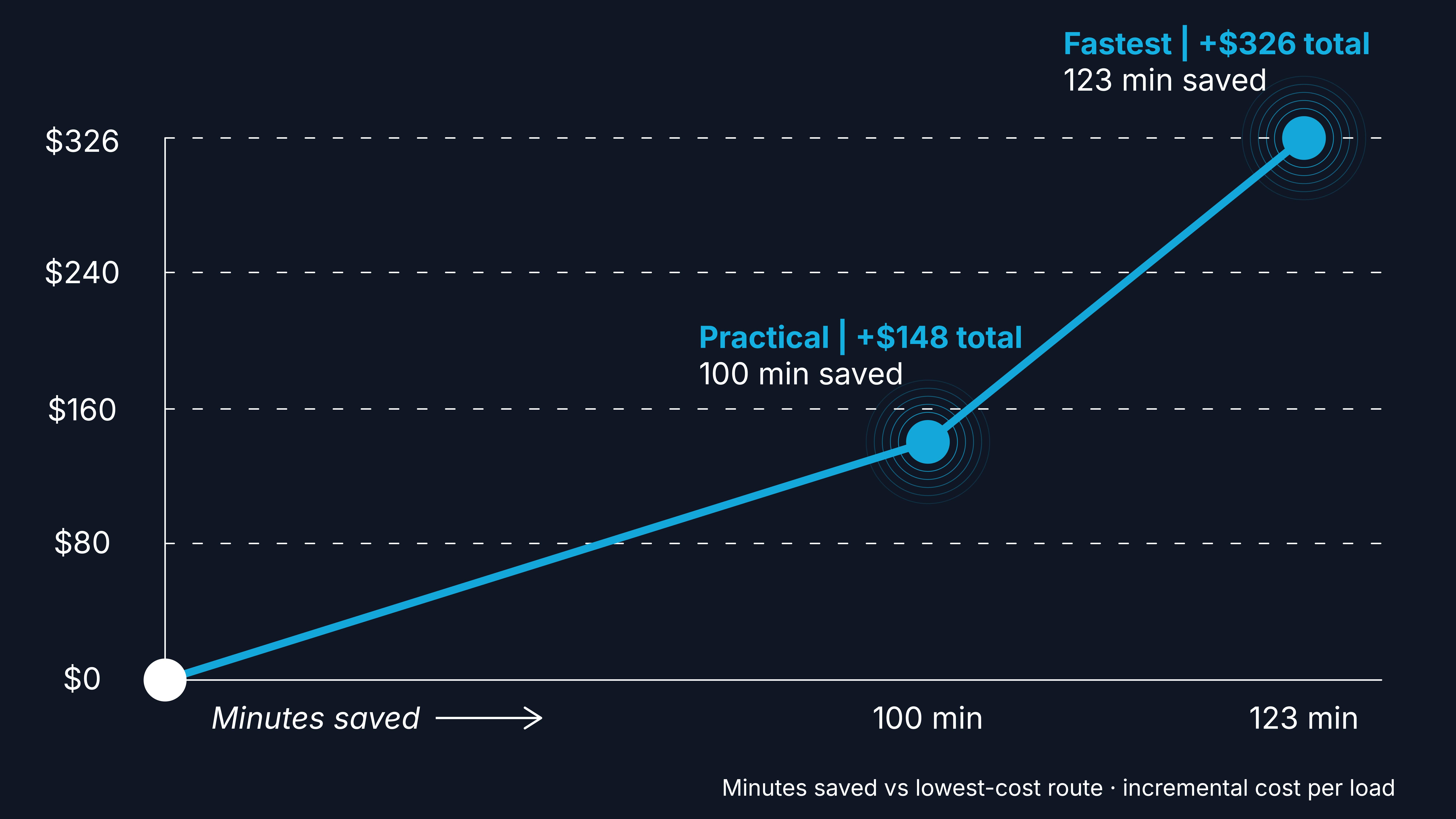
FuelGuru analysis of a Harvey, IL to Philadelphia, PA dry-van lane, published August 2026. Fuel prices, tolls and trip economics vary with timing, equipment, payment method and fleet configuration.
$1.48
per minute for the first 100 minutes of time saved
$7.74
per minute for the last 23 minutes to the fastest route, about $464 an hour
"Avoid tolls" is not a strategy. "Always take the toll road" is not a strategy either. Put a price on time, fuel and tolls, then decide.
FuelGuru returns practical, fastest, cheapest and alternate routes with drive time, vehicle-specific tolls, fleet-net fuel cost, prescribed stops and gallons, and total trip economics. FuelGuru prices the economics. NavGuru executes the chosen route in the cab.
Fleet routing
A generic truck route knows the road network. It does not know your yards, your customers' gates, or the roads your drivers have learned to stay off. Your fleet's GPS history does.
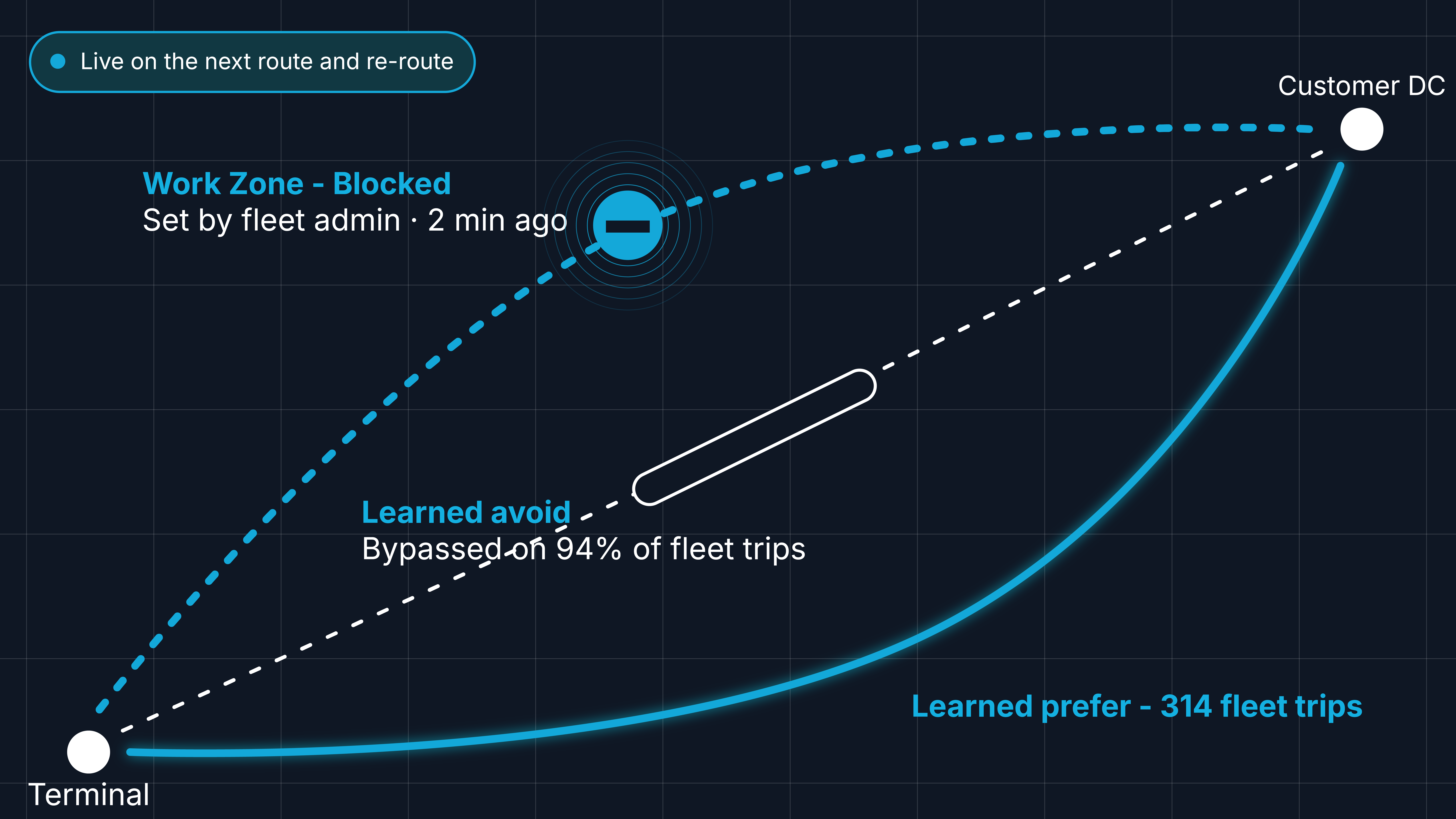
Illustrative network. FuelGuru learns road preferences from each fleet's own historical GPS trips. Segment preferences set by a fleet admin apply to new routes and re-routes.
Learned from your trips
FuelGuru reads your fleet's historical GPS: the approaches, access roads and corridors your trucks actually use, and the ones they consistently avoid.
Tuned by road segment
Know a road better than the data does? Prefer, avoid or block any segment.
Real-time updates
The change applies the moment you save it, on the next route and every re-route. Nobody waits for a map update.
Every route, and every fuel stop priced along it, starts from your fleet's road network. Not a one-size-fits-all truck map.
The loop
One decision, carried all the way from dispatch to the fuel-card line. What actually happened sharpens the next prescription on that lane.
Before the truck moves
Combine the trip, current fuel state, fleet pricing and policy. Price every candidate stop. Return the route, stops and gallons.
In the cab
Put the prescription into NavGuru, the TMS trip plan or the driver's existing in-cab workflow. No navigation switch required.
As the trip changes
Missed stop, off route, lower tank than expected, prices moved. Recalculate from the truck's current state instead of forcing it back to a stale plan.
After the pump
Match GPS and fuel-card transactions against the active prescription: stop, gallons, price paid and compliance, per driver, per stop, per trip.
LearnVerified outcomes feed stop acceptance and the next prescription on that lane.
Proof
Measured in operation
74% → 98%+
fuel prescription compliance within four months of putting the plan in the driver's navigation
Demonstrated on fleet route data
$30 to $60
per trip fuel optimization opportunity, shown live on enterprise route data at FreightWaves F3

“The utilization of GPS data, fuel-in-tank telemetry, and route planning allows the MapUp products for managing and auditing toll expenses, as well as fuel purchase planning. These tools afford us the opportunity to better utilize data in our edge environments to run a more efficient fleet.”

Integrations
Three connections, set up once at onboarding: vehicle state, fuel economics and trip execution. Plus MapUp's licensed station-level price feeds, updated multiple times a day. No rip and replace.
In · Vehicle and telematics
GPS, tank level, odometer, vehicle state
Telemetry sources include



FuelGuru
Prices every candidate stop and route on your economics and policy. Prescribes stops and gallons. Verifies against transactions.
Out · Dispatch and execution
TMS trip plan · NavGuru · in-cab workflow

In · Fuel economics
Fleet card rates and transaction files under your authorization, plus station-level pricing
Card programs include



For agents and developers
MapUp introduced FuelGuru MCP in August 2026, bringing fleet-specific fuel, toll and commercial-route economics directly into dispatch agents, TMS copilots and load boards. The agent handles the conversation. FuelGuru handles the transportation math.
The first production Model Context Protocol server built for fleet-specific fuel purchasing, toll and commercial truck routing decisions. FreightWaves, 13 Aug 2026
Agent asks
IllustrativeTruck 1427 is in Nashville with 62 gallons. Load delivers tomorrow 08:00 in Charlotte. Which route keeps the most margin, and where should he fuel?
FuelGuru MCP
Structured answer
Responses come back as structured data, so a partner can drop the numbers into a ranking, a UI card or a voice answer. The same engine is available over the FuelGuru API.
Start with your own lanes
You do not need to deploy FuelGuru, or change driver behavior, to find out whether the opportunity exists. Send historical trips, vehicle assumptions, fuel purchases and pricing. FuelGuru replays your top lanes and returns the prescribed routes, stops, gallons and modeled economics against what actually happened.
What you get back
Guides
Already evaluating or using FuelGuru? Set up your fuel program, prove the economics on your own lanes, and see whether the prescribed savings actually happen.
Get started
Prove it on your own lanes first, then connect telematics, your card program and dispatch, load tank sizes, your network, prices and policy, put the prescription in the cab, and test it in a real truck. Troubleshooting and support on the same page.
FuelGuru setup and pilot guide →Run your fuel program
What a prescription contains, how a stop is priced, what happens when the trip changes, blocking a stop, investigating a missed prescription, and the weekly review.
Fuel manager and dispatcher guide →Measure the savings
Which stop on your list, whether the fuel was in network at all, whether the driver fueled where prescribed, and which receipts the truck's own data cannot support. How the annual figure rebuilds from gallons and cents per gallon.
Compliance and savings →Find an answer
Negotiated prices, partial fills, reefer, IFTA, detours, missed stops, fuel level readings, card programs, NavGuru, TMS and API, savings and support, grouped by who usually asks.
Browse the FuelGuru FAQ →References: POC data requirements · API documentation · Planning view
FAQ
One decision per trip
Run a prescription on a lane of yours, or let us replay the trips you already drove.