What FuelGuru does on every trip
FuelGuru turns your fuel policy into a decision on every eligible trip: where this truck should fuel now, and how many gallons it should buy. Not a list of approved stops for the driver to interpret, and not the cheapest sign on the road. The same six steps run for every trip.
The trip arrives
From dispatch, the TMS or the in-cab workflow, with the truck's tank size, MPG and current fuel level read from telematics.
Your policy is applied
Full or partial fill, the out-of-route cap, preferred and hedged stops favored, stops set back from the highway penalized, disabled stops excluded, reserves for tractor and reefer.
Every candidate stop is priced
Your card rate at that station, the state price and tax spread, the detour to reach it, and the price file that will apply at the truck's arrival time, not the file at dispatch.
The prescription is delivered
Inside NavGuru turn by turn, into the TMS trip plan, or onto the in-cab surface you already run. Station and gallons, in order.
It recalculates mid-trip
As position, tank level, prices and stop availability change. A missed stop does not drag the truck back; the best remaining prescription is computed from where the truck is now.
The loop closes
Card transactions are matched to the active prescription. Compliance per driver, per stop, per trip, and what each deviation cost.
Two roles use this page. The fuel manager owns the network, the prices, the policy and the compliance review. The dispatcher sees the prescription on the trip, changes trips, and answers the driver. Where NavGuru is the in-cab surface, the dispatcher side of trips is in the NavGuru fleet and dispatcher guide; this page covers the fuel side.
1. Where it lives
FuelGuru runs inside the same dashboard as NavGuru (access steps). Three places matter day to day.
| Where | What it is for | Who uses it |
|---|---|---|
| Routing, then Setup, then Fuel stops | Your network: every stop with the current diesel price, active or blocked, add a stop, block a stop | Fuel manager |
| Fuel savings | The compliance and savings views: scorecard, station mix, truck drill-down, receipts that do not fit the truck, stations and states, summaries, in-network compliance | Fuel manager, finance |
| The trip (Live monitoring and Route compliance) | The prescription on the trip, the fuel level chart, the cost card per leg and the trip total, prescribed against actual after the trip | Dispatcher, fuel manager |
| Planning view | Run any lane by hand: origin, destination, truck, tank level, and see the route options and the prescription before dispatching | Fuel manager, dispatcher, anyone evaluating |
2. Manage your network
The network is the list FuelGuru prescribes from: your approved stops, your yards, and the stops your drivers already use. Each stop is active or blocked, carries the day's price at your card rate where the rate file covers it and the posted price where it does not, and carries a stop-feature score.
- Add a stop when a contract adds a location or drivers are already using one you want priced.
- Block a stop when a pump is bad, access is a problem or a contract ends. Block it once; every affected trip re-prescribes to the next best stop and nobody has to call the driver. When trucks that are sent to a stop stop fueling there, that pattern is itself the signal a fuel manager reviews.
- Yards are priced at your own yard cost per day, so a yard fill competes with a truck stop on the same basis and the yard wins where it should.
- Stop-feature score. Public rating, satellite imagery of the lot, amenities and the traffic signal at the entrance, rolled into a risk category from Low to Very High. High and Very High stops are penalized or excluded in your policy. Your fleet's own acceptance history at the stop, how often drivers fuel there when sent, sits on top of it.
Network compliance and stop selection are different levers
Whether a fill is inside the approved network at all, and which stop on the network it was, are measured separately. The first is where most fleets' early saving comes from; the second is what the lane analysis prices. Compliance and savings keeps them apart.
3. What a prescription contains
Per trip: the ordered stops, and for each one the station, the expected arrival time, tractor gallons, reefer gallons for refrigerated loads, the price per gallon at your card rate, the detour miles and minutes, and the tank on arrival and departure. Then the trip total: fuel cost, gallons, detour, and the saving against filling anywhere. "Go to this station" is a recommendation. "Buy 62 gallons here, then 108 at the next preferred stop" is a prescription.
Fuel stop 1
Illustrative
- Station
- Stop on your list, exit shown
- Arrival
- Expected time, from the plan
- Buy
- 62 gal tractor
- Reefer
- 18 gal, where applicable
- Price
- $3.12 / gal at your card rate
- Detour
- 1.4 mi, 4 min
- Arrive tank
- 21%
- Depart tank
- 58%
Why this stop: in your network; price advantage at your card rate; inside the out-of-route policy; better economics at the next stop.
Trip prescription
Illustrative
- Stop 1
- 62 gal here
- Stop 2
- 108 gal, 214 mi ahead
- Reserve at stop 2
- 17%
- Out-of-route
- 3.1 mi total
- Trip fuel cost
- Shown per trip
- Saving vs fill anywhere
- Shown per trip
Sometimes the best fill is not a full fill: enough at stop 1 to reach the lower price at stop 2 with the reserve intact.
How much to buy comes from the fuel already on board, the reserve you require, the route ahead, the price opportunities on it, tank capacity and your policy. A conventional plan fills the tank at stop 1 and has no plan for the next purchasing opportunity. FuelGuru buys enough at stop 1 to arrive at stop 2 with the reserve, then buys the rest at the lower fleet-net price.
4. How a stop is priced
The cheapest pump is not always the cheapest stop. Four effects stack, and most of them are invisible to anything reading a public price feed.
| Effect | What FuelGuru does | Why it matters |
|---|---|---|
| Your fleet-net price | Prices each station at the rate your card actually captures there, not the sign price or a national average | Two approved stops with the same sign price can differ by your discount at each brand |
| State price and tax | Normalizes station prices for state fuel taxes and IFTA, so stops in different states are compared on what the fleet actually pays | Fill before the state line, not after it. The IFTA credit is in the math |
| Detour | Prices the miles and minutes to reach the station against the pump saving, inside your out-of-route cap | A ten-cent advantage does not justify a six-mile detour; a two-cent advantage may justify a quarter mile |
| Price at arrival | Hours of service are in the plan, so each stop is priced on the file that will apply when the truck gets there | Some fleets receive several price files a day; a plan built at 9am for a 4pm fill on the 9am file is quietly wrong |
Two more things make the plan happen rather than sit in a report. Stop acceptance: every stop carries your fleet's own history, how often drivers fuel there when sent, and FuelGuru prescribes where that is high. Stop features: the lot, the entrance and the amenities are scored so a truck is not sent to a stop it cannot get in and out of.
The engine is a deterministic computation core: the same inputs produce the same prescription, and every stop's price can be rebuilt from your rate file, the price feed, the tax table and the detour. Ask why a stop was chosen and the answer is arithmetic, not a model's opinion.
5. Route economics
Fuel is one line of the trip's economics, and the route decides the others. For any lane FuelGuru returns the practical, fastest, cheapest and alternate routes with drive time, vehicle-specific tolls, fleet-net fuel cost, prescribed stops and gallons, and the total. The dispatcher picks with the price tag showing.
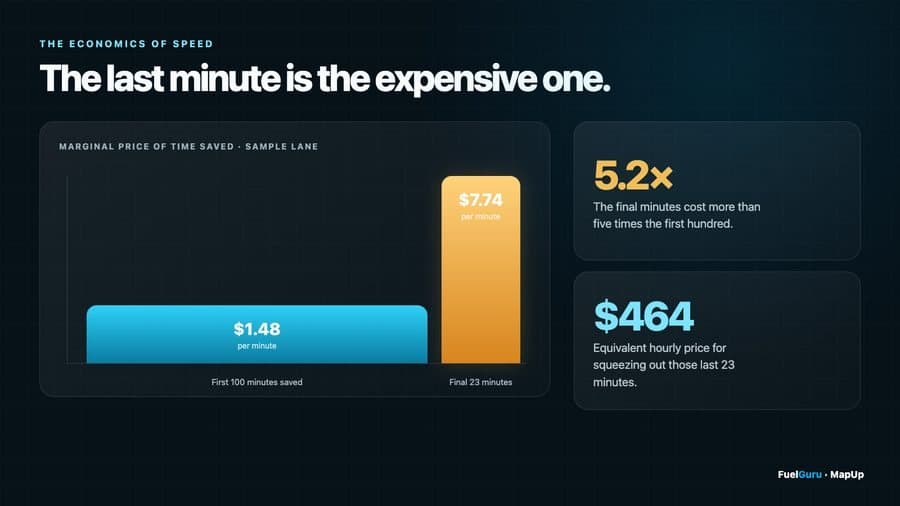
"Avoid tolls" is not a strategy. "Always take the toll road" is not a strategy either. Put a price on time, fuel and tolls, then decide. Where NavGuru is deployed, the chosen route and its fuel stop go to the cab as one plan.
6. When the trip changes
A prescription is a plan for the trip as it stands. When the trip changes, so does the prescription, from the truck's current position and tank level rather than the original plan.
| What changed | What happens |
|---|---|
| Dispatcher adds a stop, reorders stops or changes the destination | A new prescription against the new trip. Where NavGuru is the surface, the route and the fuel plan recompute together and reach the driver in about two seconds without restarting navigation. |
| The prescribed stop is blocked by a fuel manager | The stop drops out; the next best in-network stop is prescribed. |
| The driver passes the prescribed stop | The best remaining prescription from where the truck is now. The miss is recorded and appears in compliance with the reason, if one is given at the next stop. |
| The tank level drifts from plan | Re-prescription when the difference changes the answer. If range falls below the route to the next fuel plus the reserve, NavGuru escalates and routes to the nearest in-network station. |
| A price file arrives | Stops ahead are re-priced on the new file; the prescription changes only when a different stop wins. |
| The prescribed stop is unavailable on arrival | The next in-network option is offered with the detour time. |
Every version of a prescription is kept. Compliance is measured against the version that was active at the time of purchase, so a revision made after the driver fueled is never counted against the driver.
7. Reading the fuel views
The Fuel savings views answer four different questions, and a savings number is only as good as the question it answers. In short: the scorecard prices which stop on your list each truck bought at, on the same gallons; in-network compliance measures whether fuel was bought inside the network at all; prescribed against actual measures whether the driver fueled where FuelGuru said; and receipts that do not fit the truck lists fills the telematics cannot support, excluded from every saving and reported with the evidence. The Compliance and savings page defines each one, the rules behind it and how the annual figure is rebuilt from gallons and cents per gallon.
For the day-to-day: off-network fills are flagged the same day and land on the driver scorecard. Review it with drivers weekly. That review, not the software alone, is what moves compliance from the 70s to the high 90s.
8. Investigating a missed prescription
Work through the sequence in order. The aim is not only to score the miss; it is to know why the expected behavior did not happen, because the reason decides who acts.
Was there an active prescription?
Open the trip and confirm a prescription existed for the time and the leg. A hand-typed destination in the app has no dispatch and no prescription.
What did it say?
Station, gallons, arrival time, and the version active at the time of the fill.
Did it reach the driver?
On NavGuru, the stop is on the route and announced; check the session. On a TMS or third-party surface, check the delivery record on the integration.
Did the truck pass the stop?
The GPS track on the day map shows the route as driven with the prescribed stop and the actual fill on it.
Where did the truck actually fuel?
The card transaction, matched to the truck and the day; the price paid against the price at prescription and at arrival.
What changed?
Route, tank level, price, a dispatch change, a blocked stop, or the driver's choice. A reason code entered at the next stop, where the fleet asks for one, is on the record.
Then classify: driver choice goes on the scorecard; a dispatch change or safety reroute is attributed to the system, not the driver; a stop that is repeatedly skipped goes on the network review; a delivery failure is a ticket.
9. The weekly review
Thirty minutes a week between the fuel manager and MapUp, on the same numbers every time. Which trucks fueled outside the network, and what it cost above the in-network price. Which drivers missed a prescribed stop, and why. Which stations are prescribed often and skipped often. Which lanes carry the largest recurring opportunity. How much of the saving is coming from compliance and how much from stop selection. Which stops to prefer, penalize or block. Whether the policy is producing prescriptions drivers accept.
The weekly savings email to your operations and finance sponsors carries the same lines: enrolled and active trucks, gallons in and out of network, prescription compliance, cents per gallon captured, dollars saved this week and to date, and what the whole fleet would save at 50, 75 and 100 percent of eligible loads on your own lane mix.