Fleets and fuel managers
Grouped by who usually asks. Every answer is the one we give fleets in evaluation and production. If yours is not here, write to fuelguru@mapup.ai and we add it.
Where to fuel and how many gallons, per trip, in order: the station, the expected arrival time, tractor gallons and reefer gallons, the price at your card rate, and the detour to get there. Then the trip total against filling anywhere. It is a prescription, not a recommendation: "buy 62 gallons here, then 108 at the next preferred stop", not "there is a cheaper station nearby".
No. Price is one input. Every candidate stop is priced on your negotiated rate at that station, the state price and tax spread, the detour to reach it, and the price file that will apply when the truck arrives, then constrained by your policy and your network. The cheapest sign on the road is often not the cheapest stop for this truck on this trip.
No. FuelGuru can start as the economics and prescription layer and deliver into the workflow you already run. Start with a lane analysis on your historical trips and decide from the number. If you keep an existing plan, its export becomes the pilot baseline.
Yours. With your card program connected under your authorization, each stop is priced on the rate your card will capture at that station, against the state tax spread, on the latest pricing applicable to the planned arrival window. MapUp's own station-level price feed covers stops that are not on your rate file. Without a rate file, prescriptions run on posted prices and are useful for testing the flow, not as a savings basis.
Because a partial fill can carry the truck to a lower price further along the lane with the reserve intact. How much to buy comes from the fuel on board, the reserve you require, the route ahead, the prices on it, tank capacity and your fill policy. Where your policy requires a full fill, that is what is prescribed.
Yes, inside the same prescription. For refrigerated loads the reefer is a second tank on the trip with its own capacity, level and burn rate. Each stop states tractor gallons and reefer gallons so both arrive with the required reserve, and reefer purchases are measured for compliance on their own line.
Yes. Station prices are normalized for state fuel taxes and IFTA so stops in different states are compared on what the fleet actually pays; the IFTA credit is in the math. Fill before the state line, not after it, when that is what the arithmetic says. IFTA reporting itself stays in your existing process, or in MapUp's IFTA product, which runs on the same GPS and fuel data.
Yes, and FuelGuru runs inside it. Minimum arrival reserve, maximum out-of-route miles, full or partial fill, minimum purchase, preferred networks and hedged locations, penalties for stops set back from the highway, disabled stops, and how High and Very High risk stops are treated. Set once per fleet account or operating group, applied to every prescription, locked from the cab. The controls are listed in the setup guide.
Yes. Yards and private fuel locations are part of the network and are priced at your own yard cost per day, so a yard fill competes with a truck stop on the same basis. On lanes where the yard wins, the prescription says so.
Yes, from the fuel stops page, and every affected trip re-prescribes the moment you do. Nobody has to call the driver. Bad pump, access problem, contract change: block it once.
It prices the miles and minutes to reach the station against the pump saving, inside the out-of-route cap you set. Large fleets often cap out-of-route at two or three miles, and FuelGuru enforces it. A ten-cent advantage does not justify a six-mile detour; a two-cent advantage may justify a quarter mile.
Yes, two ways. Every stop carries a stop-feature score from its public rating, satellite imagery of the lot, amenities and the traffic signal at the entrance, so a cheap price never sends a truck to a stop it cannot get in and out of. And every stop carries your fleet's own acceptance history, how often drivers fuel there when sent. FuelGuru prescribes where acceptance is high, because a stop that saves $3 on paper and gets skipped saves nothing.
For the lane analysis: three months of trips, vehicle and tank assumptions, fuel transactions and your card pricing; GPS traces are recommended. The full list is on the POC data requirements page and the readout comes back roughly two weeks after a complete data drop. For a live deployment, the technical connection takes days; driver compliance ramps over three to four months as the stop shows up in navigation.
The fleets in production are OTR and dedicated carriers: truckload, tanker and refrigerated, with a fuel card program, a negotiated network and dispatch to the cab. The engine prices any vehicle with a tank, a route and a price file, and the toll and route products serve delivery, rental and field service fleets, but every published FuelGuru result is trucking.
Dispatchers
On the trip in the dashboard: the prescribed stops with station, gallons and arrival, the fuel level chart, and a cost card per leg with the trip total. After the trip, prescribed against actual sits under the same trip. To try a lane before dispatching it, use the planning view.
FuelGuru recalculates from the truck's current position, tank level and the prices ahead. It finds the best remaining prescription, not the old one. The miss is recorded and shows up in compliance with the reason, where the fleet asks the driver for one at the next stop.
The prescription is recomputed against the new trip from where the truck is now. Where NavGuru is the surface, the route and the fuel plan recompute together and reach the driver in about two seconds without restarting navigation. Every version is kept; compliance is measured against the version active at the time of the fill.
The next in-network option is offered with the detour time. If a fuel manager blocks the stop, every other affected trip re-prescribes as well. When trucks sent to a stop keep not fueling there, that pattern is the signal to review the stop.
Because none was needed: the range on board covers the leg plus the reserve, or no priced in-network station sits inside the out-of-route limit for the trip. The reason is on the request. No unnecessary stop is the correct result, and it is common on short urban lanes with a tight out-of-route cap.
You are probably reading the cost card for one leg after a reroute rather than the trip. The trip view shows a card per leg and a total.
The dashboard reads the engine's fuel sensor through your telematics platform. A float in a moving tank reads a wave, so the raw value moves by several percent on curves and grades, and every telematics vendor filters it. The chart shows the raw series; FuelGuru smooths it before a prescription uses it. A difference of a few points at one moment is expected. Report only a large, persistent difference on level road.
Yes. Long trips are planned as a sequence, and the gallons at each stop are chosen with the next stop in view. That is what makes a partial fill at stop 1 sensible when stop 2 is cheaper.
Drivers
Your fuel stop, inside your route, with the station and the gallons to buy: "Fuel stop in 28 miles, 121 gallons." On NavGuru it is announced on route and sits in your turn-by-turn like any other stop. On a TMS or another in-cab app it is on your trip plan. The fuel section of the NavGuru driver guide covers the cab.
No. The prescription comes to the screen you already use for the trip. There is nothing to install and nothing to check separately.
Keep driving. The next in-network option is offered with the detour time. You are never expected to force your way into a stop that does not work for your truck.
Nothing to undo. A new stop is worked out from where you are now, and it is the best remaining option, not the old one. The miss is recorded; if your fleet asks for a reason, it is asked at your next stop, never while moving.
Because a cheaper stop is ahead and you can reach it with fuel to spare. Buy the gallons shown; the next stop is already in your route with its own gallons.
Your fleet card, as usual. The prescription is priced on the rate your card gets at that station, and the stop is one your fleet already allows. Fueling somewhere else on a personal card or cash is what the fleet sees as an off-network fill.
If your range falls below what you need to reach the next fuel plus your fleet's reserve, NavGuru escalates and routes you to the nearest in-network station. You do not have to work it out yourself.
Yes, on refrigerated loads. Each stop states tractor gallons and reefer gallons so both tanks arrive with the reserve your fleet requires.
IT and the card program
Three, set up once at onboarding: telematics and ELD (live GPS, tank level, odometer), your fuel card program (the negotiated rate file and transaction files, delivered by SFTP one to four times daily under your card agreement), and dispatch or TMS (the trip in, the prescription back). Plus MapUp's licensed station-level price feed. Details in the setup guide.
Platform Science, Geotab, Samsara, Motive and OEM feeds flow GPS into FuelGuru today, and fuel level where the provider's API exposes it. Tank capacity and MPG do not come from telematics; the fleet supplies them per vehicle or per class.
WEX and EFS, Comdata, Fleet One and AtoB: the negotiated rate file for pricing and the transaction file for compliance, both under the fleet's data-share authorization. If your program is not listed, ask; the format is a rate file and a transaction file, and most programs can produce both.
FuelGuru prescribes, delivers and measures. Card authorization stays with your card provider as the system of record. Ask us about your program if you want to discuss card controls in your deployment.
No. The prescription can go into your TMS trip plan or a third-party in-cab surface through the FuelGuru API. You get the tightest closed loop, including mid-trip re-prescription and live measurement in one dashboard, when NavGuru is the navigation.
Neither. NavGuru routes and navigates without FuelGuru; FuelGuru prescribes into a TMS or another surface without NavGuru. Together: FuelGuru decides, NavGuru executes, and the stop is inside the driver's route. The NavGuru setup guide has the combined steps.
Yes. The trip comes in with origin, stops, appointment windows, driver and truck, and the prescription goes back into the trip plan. Repeatable integration, not a bespoke build; enterprise deployments always involve some configuration and sign-off on your side.
Yes. Hand it the load, truck position, equipment, appointment windows, tank level, fuel economy, card pricing and fleet rules, and it returns practical, fastest, cheapest and alternate routes with drive time, vehicle-specific tolls, fleet-net fuel cost, prescribed stops and gallons, and total trip economics as structured data. The same engine is available to AI agents, load boards and TMS copilots through FuelGuru MCP. API documentation.
A deterministic computation core over a proprietary truck routing engine. The same inputs produce the same prescription, and every stop's price rebuilds from your rate file, the price feed, the tax table and the detour. There is no model whose opinion has to be trusted.
Fleet data is separated per account. Rate and transaction files run under your card program's data-share authorization, and dashboard users have role-based access managed under Members. Customer data is held under the customer's agreement and is not shared in any form.
Savings and reporting
Four ways, kept apart. Stop and day selection: same trucks, same miles, same gallons burned, what the fuel would have cost buying where and how much FuelGuru prescribes among the stops you already allow. In-network compliance: the share of fuel bought inside your network and what off-network fuel cost above the in-network price. Prescription compliance: whether the driver fueled at the prescribed stop and bought the prescribed gallons. And receipts that do not fit the truck, excluded from every figure. Compliance and savings defines each.
In-network compliance asks whether the fill was on your card at an approved stop or yard at all. Prescription compliance asks whether it was at the stop FuelGuru prescribed, with the prescribed gallons. A driver can be in network at every fill and still have skipped the better in-network stop. Both are reported, and they are not added together.
The active prescription at the time of purchase against the card transaction and the GPS track: right station or an allowed substitute, gallons within tolerance, and the three prices side by side: expected net at prescription, expected net at arrival, actual net card price. Per driver, per stop, per trip, with a cause on every miss.
From your own transactions, not a model. Fuel from card transactions: gallons in and out of network, prescription compliance, cents per gallon captured. Stop selection from the same-gallons comparison on your price file. Every number rebuilds from gallons multiplied by cents per gallon, and you can audit each one against your own data.
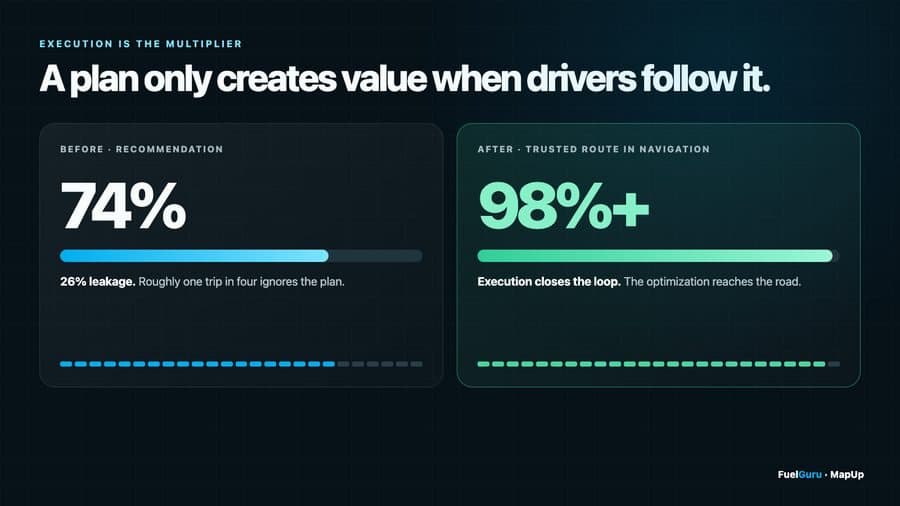
At a dedicated carrier running more than 2,500 trucks, fuel prescription compliance moved from 74 percent to above 98 percent within four months of putting the plan in the driver's navigation. On one dry-van lane, six commercial routes priced on tolls plus fuel showed a $326 per load spread. On enterprise route data shown live at an industry event, $30 to $60 per trip of fuel optimization opportunity. Your own number comes from the lane analysis on your own lanes.
Yes. Every truck has its own number and, when you open it, its day timeline and day map with both sides' fills. Drivers and trucks are ranked per eligible gallon with a minimum sample size. Lanes, corridors and hubs carry trips, gallons, actual against prescribed cost and saving per trip. Stations show where gallons were bought on each side and the shift between them.
Usually short-cycle trucks that fuel at a yard every cycle, where there is little to choose. They are included in every fleet figure; the ranking shows where the opportunity sits, which is the long lanes crossing the biggest state price differences.
Long enough to have comparable activity: enough fuel events on repeated lanes to separate a pattern from a handful of transactions. Stop selection reads within weeks on history. In-network compliance is a ramp; the published curve runs from the 70s to the high 90s over four months, so read the first month at fleet scale as the baseline, not the result.
Support
Fleet name, vehicle ID, driver ID, the trip or dispatch ID, the approximate time and time zone, the starting fuel level, the prescribed station and gallons, the stop you expected instead, the relevant policy setting and the price you know, if any, and a screenshot. With that, the inputs and the decision are reconstructed the same day. Email fuelguru@mapup.ai or the shared channel from onboarding.
P0 (prescriptions not produced or delivered for the fleet, or the dashboard down) worked immediately and fixed within five business days; P1 within one sprint, with a build every two weeks; P2 prioritized in the weekly review; questions answered on the shared channel and added here. The table is in the setup guide.
Write to fuelguru@mapup.ai with the user's email. Access is restored the same business day. Dashboard users are managed under Members by your fleet admin; the planning view login is issued by MapUp.
On the NavGuru FAQ: routing, Platform Science, vehicle profiles, traffic, alerts, devices and compliance. The two FAQs cross-reference each other where the products meet.